

Instructions for authors
This page sets out the formal requirements for manuscripts submitted to IJPSC and provides the official templates. These requirements apply in addition to the Submission Guidelines and must be followed when preparing a manuscript.
Downloads
Manuscript templates
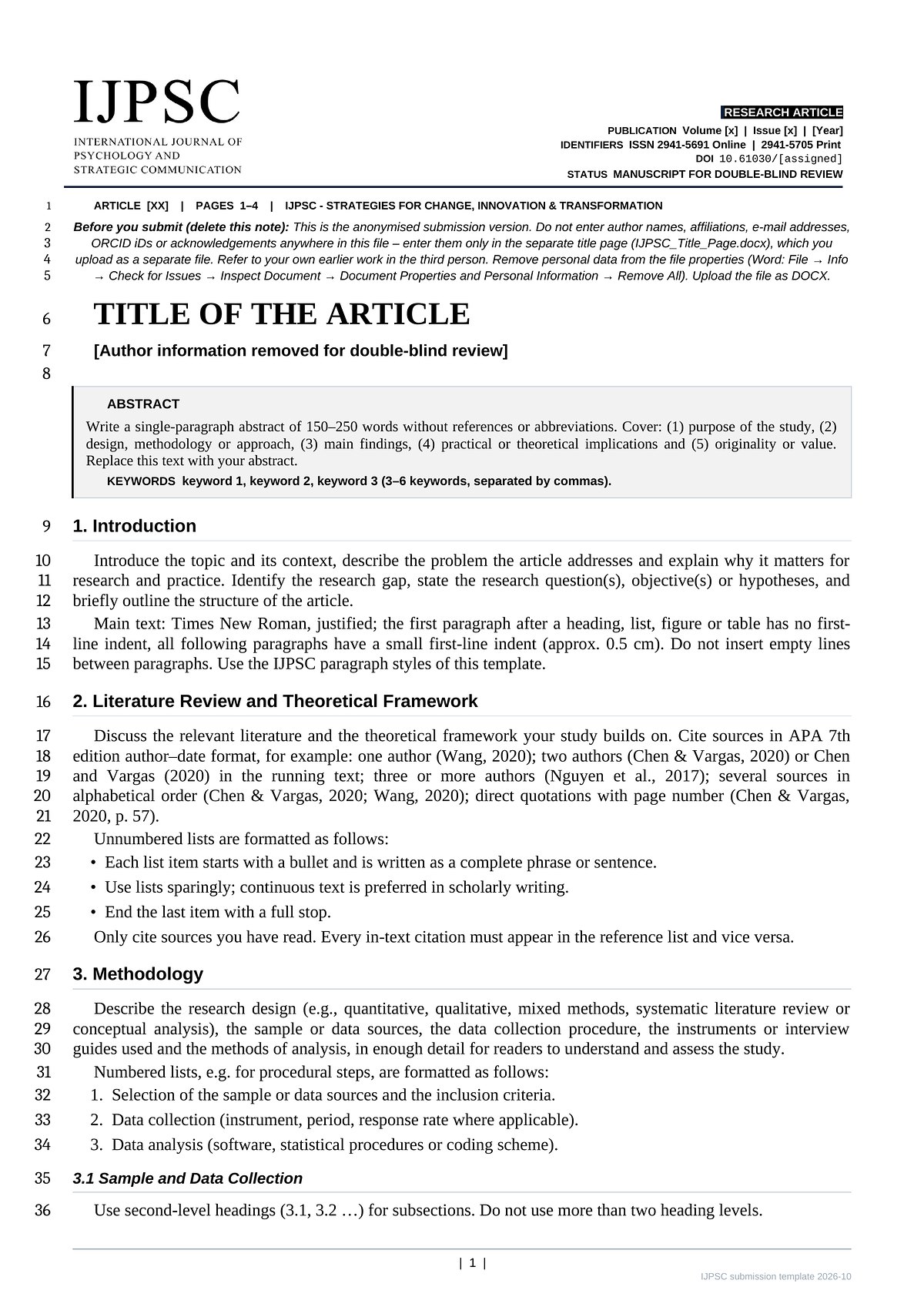
There are two manuscript templates. For the submission you use the anonymised template for peer review; the author details are entered only in the submission form of the portal. After acceptance you transfer your text into the final manuscript template and add the author names, ORCID iDs, institutions with ROR IDs and the declarations there. Both contain the required structure, APA 7 reference style and short guidance for every section.
1Manuscript for peer review submission · anonymised
Peer review submission · Word
Word document Recommended.docx · 1.5 MB · Word 2016 or later, Word for Mac
Word template.dotx · 1.5 MB · opens a new, untitled document
Peer review submission · LibreOffice
Writer document.odt · 3.2 MB · LibreOffice 7.5 or later
Writer template.ott · 3.2 MB · opens a new, untitled document
2Final manuscript after acceptance with authors, ORCID iDs and institutions
Transfer the accepted text into this template, enter all authors exactly as they are to be published – with ORCID iD and the ROR ID of the institution – complete the declarations and upload the file through the link in your acceptance e-mail. No ORCID iD yet? Register free of charge at orcid.org.
Final manuscript · Word
Word document Recommended.docx · 1.5 MB · Word 2016 or later, Word for Mac
Word template.dotx · 1.5 MB · opens a new, untitled document
Final manuscript · LibreOffice
Writer document.odt · 3.4 MB · LibreOffice 7.5 or later
Writer template.ott · 3.2 MB · opens a new, untitled document
+For revisions
Response to reviewersPoint-by-point reply for revised manuscripts. Anonymised.
Step by step
From submission to publication
IJPSC uses double-blind peer review: reviewers and authors do not know each other’s identity. For this reason, the manuscript stays anonymous until the article is accepted; the author details are entered only in the submission form of the portal. After acceptance you add them in the final manuscript template.
-
Submission Author
Prepare the manuscript in the anonymised template for peer review and submit it through the IJPSC Submission & Review Portal. Enter all authors there – with ORCID iD and, if listed, the university from the ROR register.
- Manuscript for peer review
-
Double-blind peer review Editors & reviewers
The editors check the submission and send only the anonymised manuscript to at least two independent external reviewers. Author details are never forwarded.
-
Revision Author
Revise the manuscript, mark all changes (track changes or highlighting) and reply to every comment in the response template, with page and line numbers.
- Revised manuscript
- Response to reviewers
-
Acceptance and final version Author
After acceptance, transfer the text with all changes accepted into the final manuscript template. Add all authors with ORCID iD and institution (ROR ID), complete the declarations and restore anything you anonymised for review, such as references to your own work, funders or the ethics committee. Upload the file through the link in your acceptance e-mail.
- Final manuscript
-
Production and proof Editorial office
The editorial office sets the article in the IJPSC layout, adds the publication dates, page numbers and the DOI, and sends you a PDF proof. Please check it carefully and return any corrections within the deadline given.
-
Publication Editorial office
The article is published open access under CC BY 4.0. The DOI is registered with Crossref and the metadata are made available to indexing services.
Checklist
Formatting requirements
The template already contains all of the settings below. If you use the template and its paragraph styles, your manuscript will meet these requirements automatically.
Page layout (custom margins)
| Top | 2.5 cm |
| Bottom | 1.35 cm |
| Left | 1.65 cm |
| Right | 1.65 cm |
Spacing
Follow the layout of the template exactly. The info box, title, author block, abstract and keywords and the first section heading follow one another without additional blank lines. Do not insert extra blank lines between paragraphs.
Indentation
- Body paragraphs use a small first-line indent (approx. 0.5 cm).
- No indent for the first paragraph directly after a heading, a list, or a figure or table.
Headings and numbering
- Use at most two numbered heading levels (1., 1.1).
- Headings, lists, figures and tables always start with 1 and are numbered consecutively.
- Use consistent spacing and alignment for all numbered items.
Graphics, figures and tables
- Only black-and-white graphics, tables and figures are allowed; no colour elements.
- Figure captions go below the figure, table captions above the table; sources and notes go below.
References
- Add one blank line before the References heading (as in the template).
- Use the author–date format of APA 7th edition.
- Give the DOI as a full URL (https://doi.org/…) wherever one exists.
- Remove all hyperlinks from the reference list (plain text only).
DOI format
https://doi.org/10.61030/[automatically assigned identifier]
Example: https://doi.org/10.61030/TENI9339
The DOI is assigned by the editorial office at publication. The suffix is generated automatically and does not encode volume, issue or article number. Leave the DOI placeholder in the template unchanged.
File format
Submit all files in an editable format: DOCX (preferred), DOC or ODT. PDF-only submissions are not accepted.
Tips
Good to know
- Placeholders
- Click on a placeholder such as TITLE OF THE ARTICLE and type over it. Please do not delete the placeholder fields themselves; they keep the formatting and metadata intact. For additional authors in the final manuscript, copy and paste an existing author field and affiliation line.
- Reference managers
- Zotero, Citavi, Mendeley and EndNote users can simply select the built-in APA 7th edition style.
- Google Docs
- You can edit the templates in Google Docs, but please download them as Microsoft Word (.docx) before submitting.
- Fonts in LibreOffice
- The LibreOffice versions use Liberation Serif and Liberation Sans. They have the same metrics as Times New Roman and Arial, so the page layout is identical.
- Template line in the footer
- Please leave the small grey template line in the footer. It helps the editorial office to process your files.
Questions about formatting or the templates? Please contact the editorial office.